Stony Stratford Lawn Tennis Club
The Ancell Trust Sports Ground • Stony Stratford, Milton Keynes • MK11 1AR
Dear [[firstname]] [[lastname]]
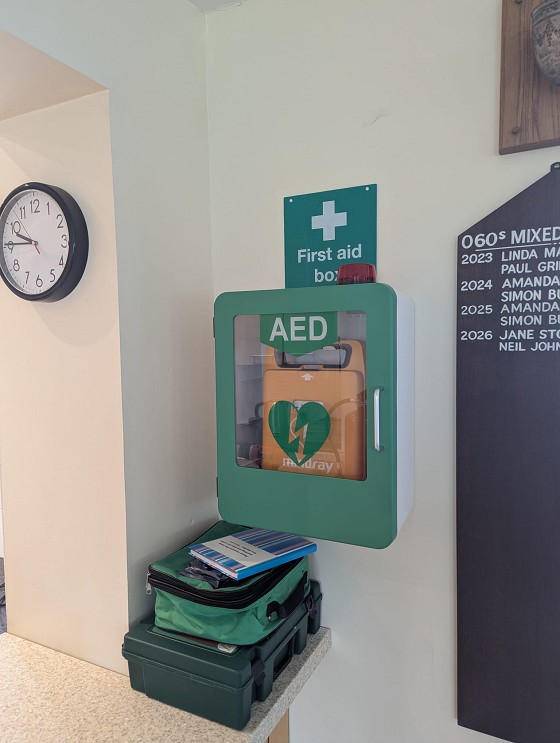
Good news. Our new defibrillator is installed at the clubhouse. The cabinet is unlocked and located on the right hand side in front of the kitchen counter (see photo below). This provides instant access to all members and hopefully avoids the delay of running to shared box on the cottage wall, and the need to dial 999 for the code to unlock the cabinet. Those six minutes would be better spend on trying to aid a recovery. The outdoor defibrillator on the cottage wall remains in place and is accessible to all with the code obtained from 999. Our first aid kit and accident book sit on the shelf below the defibrillator.
Whilst the cabinet is unlocked, it is alarmed. If the cabinet is opened the alarm will sound and the beacon will flash. If you hear this sound whilst you are at the club, it means there is an emergency. Please assist in any way you can. For example, 999 will still need to be rung to call for an ambulance. The defibrillator unit once opened will instruct the operator through the process.
We are still trying to organise the CPR training for those club members that volunteered for the course. We haven’t forgotten you and have all your names thank you. It is just proving a little more tricky to organise a date with the training provider. In the meantime, a quick reminder about the free online British Heart Foundation training, named RevivR, which is a 15-minute interactive CPR course. Start the RevivR training now by clicking this (overly long) link.
https://www.bhf.org.uk/how-you-can-help/how-to-save-a-life/how-to-do-cpr/learn-cpr-in-15-minutes?&utm_campaign=revivrppc~24-115&utm_medium=ppc&utm_source=google&utm_content=adcopy&utm_term=Headline&gclsrc=aw.ds&gad_source=1&gad_campaignid=15868423888&gbraid=0AAAAAD6mX55TWi1DAEBPghzyohySw7QcY&gclid=Cj0KCQjw-MDTBhCgARIsAKAkdlSTntrF_yGq59a65kjK_hH2m66OYMR8y72a8WjOY2cpcqgy6u6uq24aAqU6EALw_wcB
Just one other change; the fire extinguisher has been moved to the more visible position below the defibrillator rather than below the kitchen counter.
31/10/2026
October 2026
September 2026
August 2026
July 2026
June 2026
May 2026
April 2026
March 2026
February 2026
January 2026
October 2025
September 2025
August 2025
July 2025
June 2025
May 2025
April 2025
February 2025
December 2024
November 2024
October 2024
September 2024
August 2024
Hotmail/Outlook Users
GMail Users
Other email service providers may have similar settings -- please follow their instructions. If not, contact their support desk and request delivery of messages from ssltc@no-reply.mycourts.co.uk.
